A Resend-style email platform on your own Amazon SES that runs on Cloudflare Workers. Transactional email, newsletters, automations, receiving and deliverability, for as many businesses as you like.
Resend-compatible APINo per-contact pricingYour data, your accounts
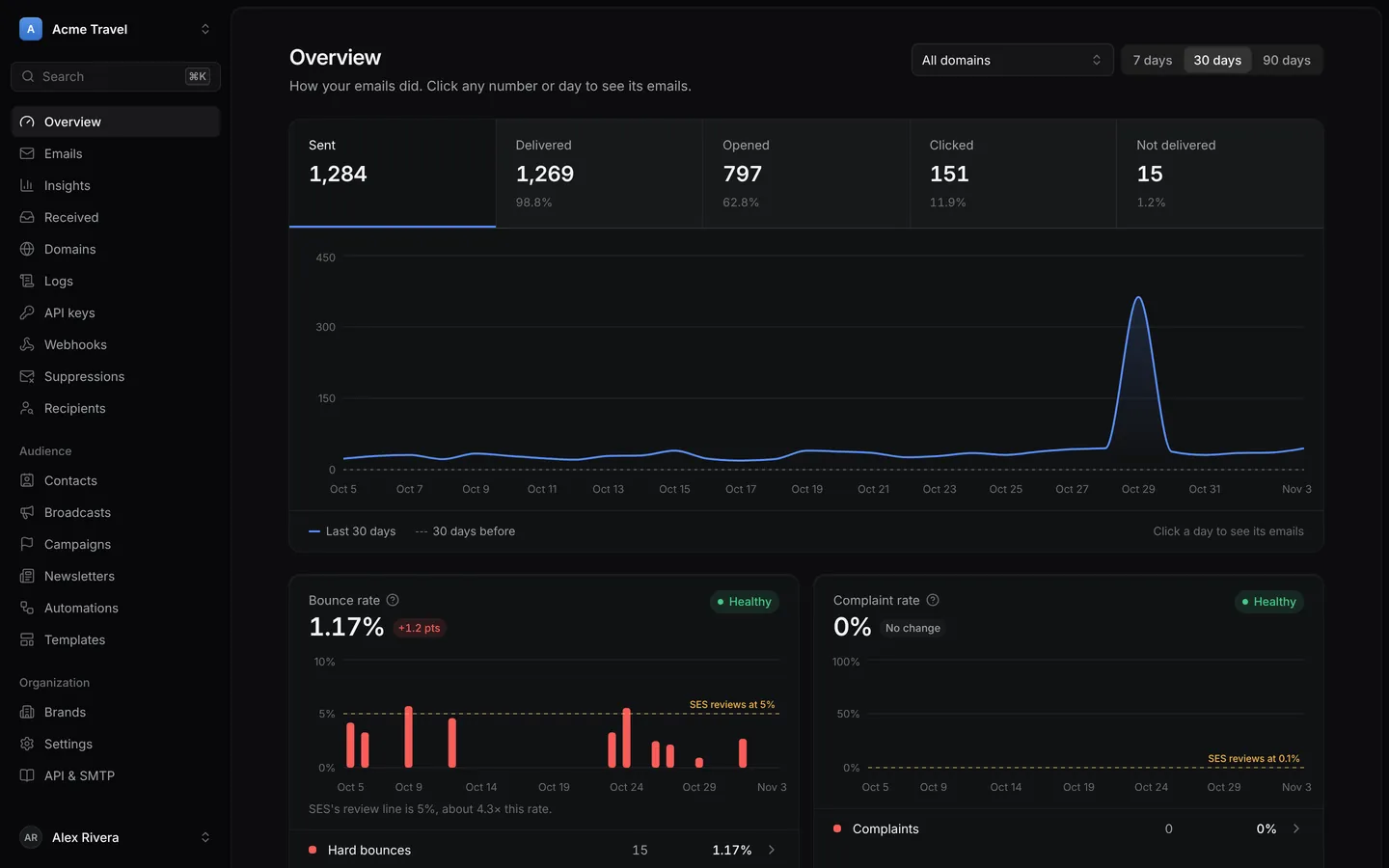
Emails38,466 sent · 98.7% delivered
mailroom.example.com
Built onAmazon SESCloudflare WorkersD1R2Durable ObjectsReact 19
The whole mailroom
Send it, grow it, receive it, protect it.
Everything a business needs from email, in one dashboard that feels like a modern app, not a control panel.
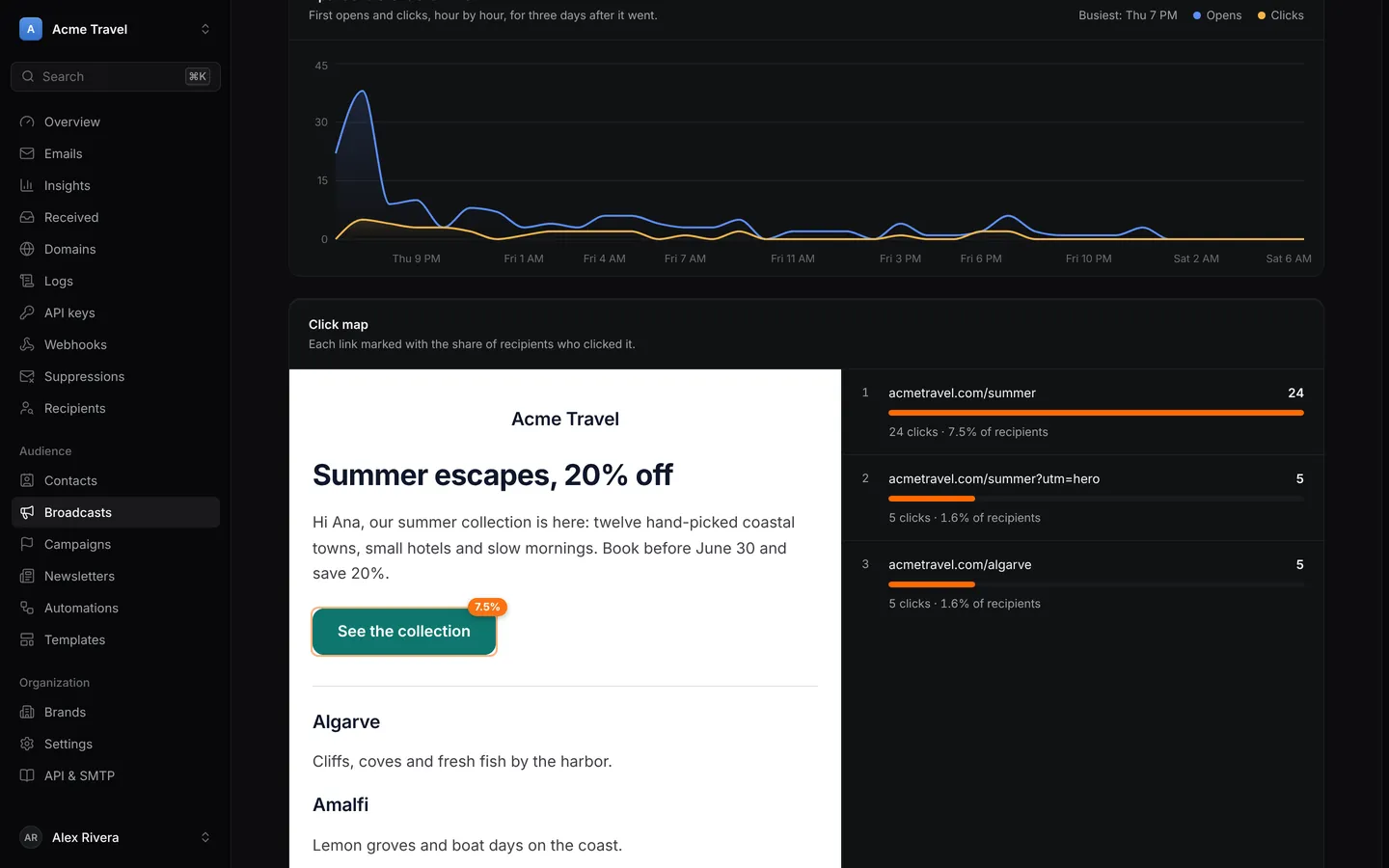
Broadcast reports. Opens and clicks hour by hour after it went, the email apps it was read in, and a click map on the email itself.
Transactional
Receipts, sign-in codes and alerts, through an API your code already knows.
Resend-compatible API: batch, scheduling, idempotency keys, tags and attachments.
Logs and timelines for every email, from SES's signature-checked events.
Templates with variables, fallbacks and published versions.
Webhooks in Resend's shape, signed the Standard Webhooks way, retried on a schedule.
SMTP, a CLI and an MCP server for everything else.
Marketing
Broadcasts and newsletters with the tools usually saved for expensive plans.
A/B tests on subject lines, local-time sends and resends to non-openers.
Newsletters with a public archive, RSS feed, blog-to-issue and referral programs.
Campaigns, polls, sign-up forms and a pre-send checklist that opens every link.
Engagement scores and list growth by source, with cold contacts to clean up.
Roles, approvals and brand kits so a team can write and an owner can sign off.
Receiving
Mail coming in is first class too, threaded into conversations a team can answer.
Inbound email checked for spam and viruses, kept whole in R2, sent to webhooks.
Conversations threaded by headers, never by subject, with per-person read state.
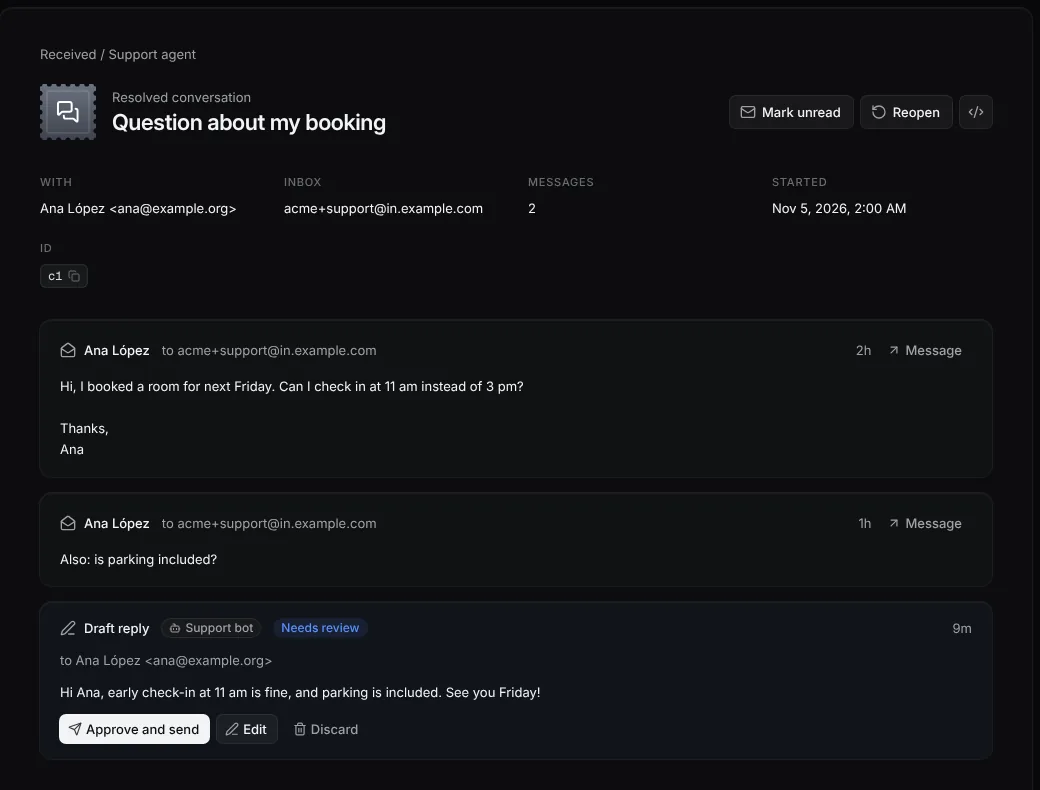
Agent inboxes with scoped credentials, drafts to approve and an audit trail.
Inbound rules that forward or drop, and replies in the same thread.
A website chat answered from the same inbox, by email if the visitor leaves.
Deliverability
The guardrails that keep your sending reputation, and your SES account, healthy.
Sending limits under SES's review lines that warn, and can pause, per brand.
Suppressions, typo'd domains caught, and one-click unsubscribe headers.
Daily DNS and blocklist watch, DMARC reports and Gmail Postmaster data.
Tracking on your own domain and one-click DNS through Domain Connect.
A mail-tester style score out of 10 for any email you send it.
Make it yours
Everything people see looks like your brand.
Emails, newsletter pages, sign-up forms and the website chat are all designed in Mailroom, with a live preview on desktop, phone and dark mode.
Emails and brand kits
Every broadcast and template, built from blocks or raw HTML.
Headings, text, buttons, images
Columns, quotes, dividers
Logo, links, footer
Palettes and fonts
Your own web fonts
Corner radius
Saved sections
Personalization with fallbacks
Brand kit that locks colors and fonts
Dark-inbox preview
Newsletter pages
A public archive, web versions and poll pages that share one look.
Logo and cover image
Colors
Light or dark
Fonts
List or cards
Header links
RSS feed
Blog-to-issue in three layouts
Referral page and rewards
Sign-up forms
Drop one snippet on your site and design it from the dashboard.
In the page, pop-up, slide-in, top bar
Card, minimal, split, banner, spotlight
Color presets or your own
Button gradient
Font, corners, size, alignment
Outline, filled or underlined fields
Shadow
Message after sign-up
Topics and segments to join
Website chat
A chat on your site, answered from the dashboard or straight from your email.
Six style presets
Accent color
Auto, light or dark
Solid, gradient or plain header
Bubble and background styles
Fonts and text size
Launcher shape, icon, text and size
Corner and spacing
Pop-up greeting
Hide on phones
Custom CSS
Your own messages
Your team
People get exactly the access they need, per organization.
Owner, admin and custom roles
Permission by permission
Approvals before a send
Comments on drafts
Version history
Passkeys, codes, passwords, Google
Two-factor authentication
Activity log
Your rules
How each organization and brand sends, receives and protects itself.
Sending limits: alert, or alert and pause
Email firewall for disposable, free and plus addresses
Unsubscribe groups and topics
Tracking domain on or off
BIMI logo
Inbound rules
Long-term archive to R2
Weekly digest
Its own SES account
For developers
Change one URL. Keep your code.
Mailroom answers Resend's API, so Resend's SDKs work by pointing their base URL at your deployment.
POST /api/emails, /batch, scheduling up to 30 days and Idempotency-Key.
Contacts, segments, broadcasts, templates and automations, all over REST.
100 requests per 10 seconds per key, so a leaked key can't take the whole account.
Keys for full access, or only sending, from one domain.
// npm install resend (RESEND_BASE_URL=https://<your url>/api)import { Resend } from"resend";
const resend = newResend(process.env.MAILROOM_API_KEY);
await resend.emails.send({
from: "Your app <hello@mail.example.com>",
to: ["ana@example.com"],
subject: "Your order has shipped",
html: "<p>It's on its way.</p>",
tags: [{ name: "kind", value: "order" }],
});
curl https://<your url>/api/emails \
  -H "Authorization: Bearer mr_..." \
  -H "Content-Type: application/json" \
  -d '{
    "from": "hello@mail.example.com",
    "to": "ana@example.com",
    "subject": "Your order has shipped",
    "text": "It is on its way."
  }'
export MAILROOM_API_KEY=mr_… MAILROOM_URL=https://mailroom.example.com
mailroom send --from hello@mail.example.com --to ana@example.com \
--template welcome --var name=Ana
mailroom emails --status bounced
mailroom tail # new emails and their events, livemailroom import contacts.csv --segment <id>
mailroom check --subject "Your order has shipped" --html email.html
Agent inboxes
Give your AI agent an inbox, not your inbox.
An agent gets an address of its own and a credential that reaches only that inbox, through the REST API or MCP. It can draft, and a person approves.
Credentials start read-only. Grant attachments, triage, drafting or sending as needed.
Only send to and never send to lists hold for every reply.
Every read, draft and reply lands in the inbox's audit trail.
Agents connect over MCP with their credential; people connect any MCP client with OAuth.
Many businesses, one deployment
One business's bounces never pause another's sending.
Each organization in Mailroom is its own SES tenant with its own configuration set, domains, keys and limits. One that should be fully apart can bring its own SES account.
Your AWS account · us-east-1
1OrganizationSending
SES tenant
its own
Bounce rate
0.8%
Domains, keys
its own
2OrganizationPaused
SES tenant
its own
Bounce rate
6.2%
Domains, keys
its own
3OrganizationSending
SES tenant
its own
Bounce rate
0.3%
Domains, keys
its own
When one organization crosses its bounce limit and pauses, the others keep sending. Brands inside an organization split it further, each with its own domains, contacts and limits.
What it costs
Pay for the email, not for the list.
You run it on your own accounts: Cloudflare Workers Paid and Amazon SES. Nothing is charged per contact, per seat or per brand, so a growing list never moves the bill.
$5a month for Workers Paid, or the free plan
$0.10per 1,000 emails, Amazon SES
$0per contact, seat or brand
Emails a month
Cloudflare Workers Paid$5.00
Amazon SES$10.00
A month
All in, per 1,000 emails$0.15
SES's list price for outgoing email. Attachments, receiving and dedicated IPs are billed by AWS as usual.
Deploy
Running in about thirty minutes.
The Deploy button copies the repo to your GitHub, creates the database, storage and bucket, and redeploys on every push. Mailroom sets up the rest of SES from its own pages.
Amazon SES
Pick a region, request production access, and create an IAM user with the policy from the README.
Cloudflare
Click Deploy to Cloudflare, or deploy from a terminal. Give it your address, admin email and AWS keys.
First sign-in
Set up events, create an organization, add a domain. Where your DNS host supports it, one click adds every record.
Smoke test
Send to SES's simulator addresses and watch delivered, bounced and complained arrive within seconds.
# or from a terminal (Node 20+ or Bun)git clone https://github.com/RVP97/mailroom &&cd mailroom
bun install
bunx wrangler d1 create mailroom # and its id in wrangler.jsoncbunx wrangler kv namespace create OAUTH_KV
bunx wrangler r2 bucket create mailroom-inbound
bunx wrangler secret put BETTER_AUTH_SECRET # and the two AWS keysbun run deploy # builds, migrates, deploys
 Mailroom